

As a supplier of Choke Control Panels, I understand the critical role these panels play in various industrial operations, especially in the oil and gas sector. Communication failures in a Choke Control Panel can disrupt operations, lead to inefficiencies, and even pose safety risks. In this blog, I will share some insights on how to troubleshoot communication failures in a Choke Control Panel.
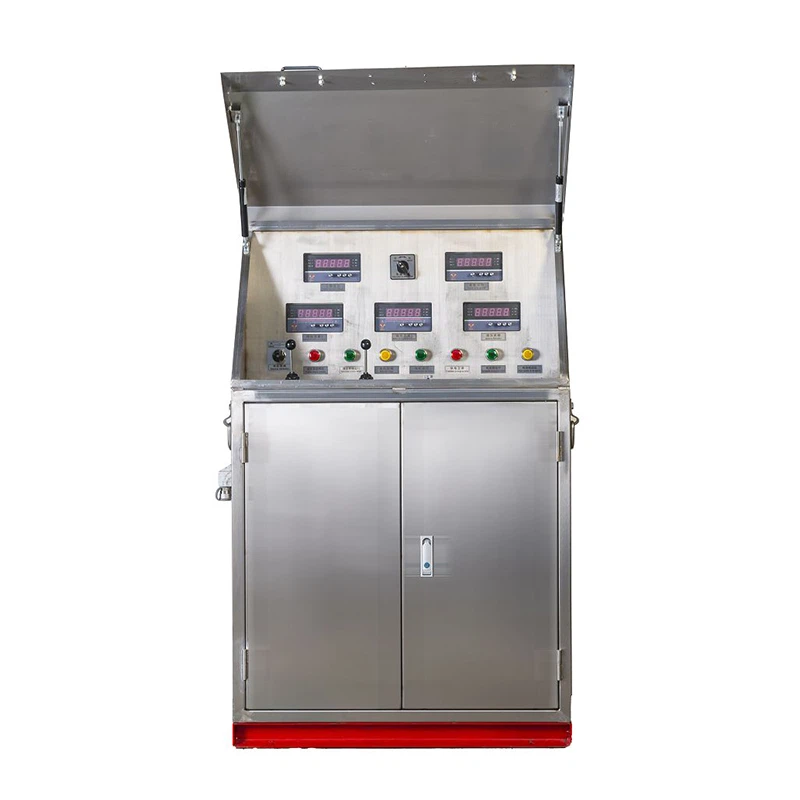

Understanding the Choke Control Panel
Before delving into troubleshooting, it's essential to have a basic understanding of the Choke Control Panel. These panels are designed to control and monitor the flow of fluids through chokes, which are essential components in well control systems. They are used in various applications, including drilling operations, production facilities, and well testing.
The Choke Control Panel typically consists of a control unit, sensors, actuators, and a communication interface. The control unit processes the data received from the sensors and sends commands to the actuators to adjust the choke position. The communication interface allows the panel to communicate with other systems, such as the wellsite control system or the remote monitoring station.
Common Causes of Communication Failures
Communication failures in a Choke Control Panel can be caused by various factors. Here are some of the most common causes:
1. Hardware Issues
- Faulty Cables and Connectors: Loose, damaged, or corroded cables and connectors can disrupt the communication signal. Over time, cables can wear out due to vibration, temperature changes, or physical damage.
- Power Supply Problems: Inadequate or unstable power supply can cause the communication interface to malfunction. Power surges, brownouts, or voltage fluctuations can damage the electronic components in the panel.
- Faulty Communication Modules: The communication modules in the Choke Control Panel, such as Ethernet cards, serial ports, or wireless modems, can fail due to hardware defects or software issues.
2. Software Issues
- Configuration Errors: Incorrect configuration settings in the communication software can prevent the panel from communicating with other systems. This can include incorrect IP addresses, baud rates, or communication protocols.
- Software Bugs: Software bugs or glitches in the control software or the communication drivers can cause communication failures. These bugs can be introduced during software development or due to compatibility issues with other software components.
- Outdated Software: Using outdated software versions can lead to compatibility issues with other systems or security vulnerabilities. It's important to keep the software in the Choke Control Panel up to date to ensure reliable communication.
3. Environmental Factors
- Electromagnetic Interference (EMI): EMI from nearby electrical equipment, such as motors, generators, or radio transmitters, can interfere with the communication signal. This can cause data corruption or loss, leading to communication failures.
- Temperature and Humidity: Extreme temperatures and high humidity can affect the performance of the electronic components in the Choke Control Panel. Overheating can cause the components to malfunction, while high humidity can lead to corrosion and short circuits.
- Physical Damage: The Choke Control Panel can be damaged by physical impacts, such as drops, vibrations, or exposure to harsh chemicals. This can damage the internal components and disrupt the communication signal.
Troubleshooting Steps
When faced with a communication failure in a Choke Control Panel, it's important to follow a systematic troubleshooting approach. Here are the steps you can take:
1. Check the Hardware
- Inspect the Cables and Connectors: Visually inspect the cables and connectors for any signs of damage, such as fraying, bending, or corrosion. Make sure all the cables are securely plugged in and the connectors are properly seated.
- Check the Power Supply: Measure the voltage at the power input of the Choke Control Panel to ensure it is within the specified range. Check for any signs of power surges or voltage fluctuations. If necessary, use a voltage regulator or a uninterruptible power supply (UPS) to protect the panel from power issues.
- Test the Communication Modules: Use a diagnostic tool or a communication tester to check the functionality of the communication modules in the panel. This can help you identify if the problem is with the hardware or the software.
2. Verify the Software Configuration
- Review the Configuration Settings: Check the configuration settings in the communication software to ensure they are correct. This includes the IP addresses, baud rates, communication protocols, and other parameters. Make sure the settings match the requirements of the other systems you are trying to communicate with.
- Update the Software: Check if there are any software updates available for the Choke Control Panel. Install the latest software versions to fix any known bugs or compatibility issues. Make sure to follow the manufacturer's instructions when updating the software.
- Check for Software Conflicts: If you are using multiple software applications on the same system, check for any conflicts between them. Disable any unnecessary software or services that may be interfering with the communication software.
3. Evaluate the Environmental Conditions
- Check for EMI Sources: Identify any potential sources of EMI near the Choke Control Panel. Move the panel away from these sources or use shielding materials to reduce the interference. You can also use ferrites or EMI filters on the cables to suppress the EMI.
- Monitor the Temperature and Humidity: Use a temperature and humidity sensor to monitor the environmental conditions inside the Choke Control Panel enclosure. If the temperature or humidity is outside the recommended range, take appropriate measures to control them. This can include using air conditioning, ventilation, or dehumidifiers.
- Inspect for Physical Damage: Check the Choke Control Panel for any signs of physical damage. If you find any damage, repair or replace the affected components as soon as possible. Make sure to follow the manufacturer's instructions when performing any repairs or replacements.
4. Perform Diagnostic Tests
- Use Diagnostic Tools: Most Choke Control Panels come with built-in diagnostic tools or software that can help you troubleshoot communication failures. Use these tools to perform diagnostic tests on the panel and identify the root cause of the problem.
- Check the Log Files: Review the log files in the Choke Control Panel to see if there are any error messages or warnings related to the communication failures. The log files can provide valuable information about the sequence of events leading up to the failure.
- Perform Loopback Tests: A loopback test is a simple way to check the functionality of the communication interface. Connect the transmit and receive pins of the communication port together and send a test signal. If the signal is received back without any errors, the communication interface is working properly.
Special Considerations for Different Types of Choke Control Panels
There are different types of Choke Control Panels available in the market, such as Electric Choke Manifold Control Panel and Drilling Choke Manifold Control Panel. Each type of panel may have its own unique features and requirements, which need to be considered when troubleshooting communication failures.
Electric Choke Manifold Control Panel
- Power Management: Electric Choke Manifold Control Panels rely on electrical power to operate. Therefore, it's important to pay special attention to the power supply and management. Make sure the panel is connected to a stable and reliable power source, and check for any power-related issues, such as overloading or short circuits.
- Motor Control: These panels often use electric motors to control the choke position. Check the motor control circuits and the motor drivers for any faults or malfunctions. Make sure the motors are properly lubricated and maintained to ensure smooth operation.
Drilling Choke Manifold Control Panel
- Wellsite Environment: Drilling Choke Manifold Control Panels are typically used in harsh wellsite environments. They are exposed to high temperatures, vibrations, and dust. Therefore, it's important to take extra precautions to protect the panel from these environmental factors. Use ruggedized enclosures, dust filters, and vibration dampeners to ensure the panel's reliability.
- Integration with Drilling Equipment: These panels need to be integrated with other drilling equipment, such as the mud pumps, the draw works, and the blowout preventer. Make sure the communication interfaces between the panel and the other equipment are properly configured and functioning correctly.
Conclusion
Communication failures in a Choke Control Panel can be a frustrating and costly problem. However, by following a systematic troubleshooting approach and considering the common causes and special requirements of different types of panels, you can quickly identify and resolve the issue. As a supplier of Choke Control Panels, we are committed to providing our customers with high-quality products and excellent technical support. If you are experiencing communication failures or any other issues with your Choke Control Panel, please don't hesitate to contact us for assistance. We can help you troubleshoot the problem and provide you with the best solutions to ensure the reliable operation of your equipment.
References
- "Choke Control Panel Handbook", Manufacturer's Manual
- "Industrial Communication Systems: Principles and Applications", Textbook
- "Troubleshooting Guide for Electrical Equipment", Technical Document